RoutCadΠde Luxe CAD-CAM Software for CNC Milling with 4th Axis Control Including Training and G-Code Tutorial Videos
Description
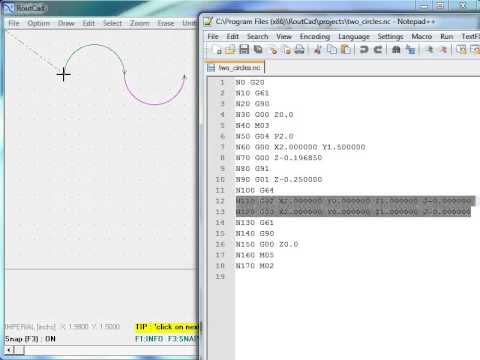
RoutCad de Luxe V 1.1.12 Full Release is a Computer Aided Design software and a Computer Aided Manufacturing software all bundle in a single easy to use package. You can use it to create contours, shapes, and 3D objects. The software has pre-defined material selection for plastic, metal, or wood. Once the object is designed, you easily define the toolpath and export to g-code .nc to be used by the Mach 3-4, Linux CNC, EMC2, Fanuc CNC Control or other CNC controller. RoutCad de Luxe V 1.1.12 Full Release is a state of the art Computer Aided Design software that allows you to create the design of your choice using the material you want. There is an abundance of options and commands that enables you to create, modify, and combine objects to quickly achieve the desired result. The software comes with a library of pre-designed shapes and a comprehensive easy to follow user manual in .pdf format. A series of training (Quick Start) videos have been included to help quickly and effectively learn the software. The software can be used in 3 axis control mode or 4 axis control mode. In 3 axis control mode, g-code will be produced to control the x, y, and z axis. In 4 axis control mode, g-code will be produced to control the x, y, z, and rotary a-axis. To enable or disable 4th axis control, simply click on the [4th Axis control] menu item. The 4th axis control enables to perform operation at a fixed 4th axis angle. In this case, the x-y-z linear axis will move and perform operation on a work piece, while holding the rotary a-axis at a fixed angle. This mode can be used to performed multiple operations on a part at various fixed angle. Each operation at a given fixed angle is exported to a g-code files. The g-code files are successively executed by the cnc controller to achieved the final desired result. The 4th axis control can also enable operation at variable 4th axis angle. In this mode the 4th axis angle can vary proportionally with the x-axis or the y-axis. To select which axis to choose simple click on the [4th axis control] menu and pick track x-axis or track-y axis. The 4th axis track-y can be used when your work piece is place on your cnc work bed along the x-axis. The 4th axis track-x can be used when your work piece is place on your cnc work bed along the y-axis. The 4th axis track-x or track-y features allows you to easily wrap around a cylinder your part design. Furthermore, it will break up any arc or parabola design into a sequence of small segment, that Mach 3 can execute. This advanced features solved the problem of making an arc around a cylinder using Mach 3. |
Features
|
Step 1 : "Install RoutCad in Windows" Using the installation CD, install RoutCadΠin Windows 95, 98, 2000, NT, Millenium, XP, WIN 7, or WIN 8. Then you active the software using the instructions provided.
Step 2 : "Design your 2D Shape or 3D Objects" With RoutCadΠit is easy to design shapes, contours or 3D objects. View the training videos or consult the manual to quickly help you perform the desired task.
Step 3 : "Define the tool path for machining" Once you complete the design of the shape you want to rout, you use the same software to define the tool path (trace) and export to g-code .nc and rout script .rs that the RoutBotΠCNC Controller or other CNC Controller like Mach 3 will use to machine the piece that you want to make.
Pentium 4 or higher, Windows 95/98/2000/NT/Millenium/XP/(Win 7 or 8 with administrator account), 32 Mb of RAM or higher, 16 Mb of Hard Disk space or higher. Acrobat pdf Reader V5.0 or higher. Windows Media Player 8.0 or higher.
This listing is for a single license of the RoutCadΠde Luxe CAD-CAM Software to be used in one PC. What is included in this listing is the RoutCadΠde Luxe Compact Disk which has RoutCadΠde Luxe software (self extract).
Terms and Conditions
Delivery Time
Once your payment is received, you have to allow 10 business days for shipping, and 15 business days for delivery if the package is to be shipped within Canada or the Continental USA.
If the shipping location is outside of Canada or the Continental USA, the delivery time may be longer. The shipment method is Federal Express Ground or USPS (Canada Post).
The RoutBotΠsoftware is made and conceived in Canada. If you're located in Canada or the USA, it is covered under NAFTA. You may have to pay duty on the items if you're located outside of Canada or the USA. If Duty is applicable; it is the responsibility of the buyer. Any other custom, brokerage or related fees are the responsibility of the buyer.
Price and Taxes
Prices are subject to change without notice. The price paid do not include taxes (except for Canada resident). The buyer is responsible for remitting any applicable taxes to its local, provincial or state authorities if the item is taxable in the buyer local region, province or state. If the buyer is located in Canada, the seller will remit the applicable taxes to the Qu꣥c Government.
Typographical Errors and Bugs
The user manual, promotional brochures, business card and any other related documentations may contains typographical errors, errors in the pictures, errors in the explanation, errors in the examples, or other errors. The RoutCadΠsoftware may also contain errors and or bugs. The above mentioned bugs and errors that may exist are not significant and do not prevent the usage of the user manual or RoutCadΠsoftware.
Return Policy
All sales of RoutCadtΠCAD/CAM Software are final sale Once you've submitted your order, there is no refund possible. It is highly recommended to ensure that the RoutCadΠCAD/CAM Software is suitable for your application before submitting your order. If unsure about a topic we encourage you to communicate with us.
LIMITATION ON AND EXCLUSION OF REMEDIES AND DAMAGES
YOU CANNOT RECOVER ANY DAMAGES, INCLUDING CONSEQUENTIAL, LOST PROFITS, SPECIAL, INDIRECT OR INCIDENTAL DAMAGES. This limitation applies to anything related to the Cover Plate and its accessories; and claims for breach of contract, breach of warranty, guarantee or condition, strict liability, negligence, or other tort to the extent permitted by applicable law. It also applies even if 6704239 Canada Ltd. knew or should have known about the possibility of the damages.
LOCATION OF LITIGATION
Any litigation against 6704239 Canada Ltd. must be brought to the Montrealӳ municipal court herein referred as "court of law", located in the province of Qu꣥c, Canada.
Limited Warranty and Responsibility
The manufacturer offers a limited time and limited scope warranty on the RoutCadΠCD media disk when it is handle with care and used in accordance with the user manual for a maximum period of 3 months from the date of original purchase.
Under these specific conditions the manufacturer will promptly replace the defective CD media disk. The limited warranty covers for a maximum time period of three months from the date of original purchase, only a defective CD media disk. There is no warranty on the RoutCadΠCAD/CAM Software, or warranty it is fit for any particular application. The manufacturer can't be held responsible for any personal injury , property damages, or loss of revenue resulting in the misuse of the RoutCadΠSoftware. The manufacturer declines any liabilities or responsibilities in the usage of the RoutCadΠCAD/CAM Software .
RoutCadΠSoftware License Agreement
BY USING THE SOFTWARE, YOU ACCEPT THESE TERMS. IF YOU DO NOT ACCEPT THEM, DO NOT USE THE SOFTWARE.
6704239 Canada Ltd. Software license terms for RoutCadΠ1.0.
These license terms are between 6704239 Canada Ltd. (the seller) and you (the buyer).
It is important to read them !
1.INSTALLATION AND USE RIGHTS
The software license you are purchasing is for the buyer to use on a
single hardware support device (single Personal Computer, IBM compatible PC).
2. SCOPE OF LICENSE
The software is licensed, not sold. This agreement only gives you some rights
to use the software. 6704239 Canada Ltd. reserves all other rights. This software is copyrighted and
trademarked, it remains the sole property of the author. You may use the software only as expressly
permitted in this agreement. You may not reverse engineer, decompile or disassemble the software, or make
backup copies, publish the software for others to copy, sell, rent, lease or lend the software or transfer
the software or this agreement to any third party.
3. BACKUP COPY
You may purchase a backup copy of the software from the seller.
4. EXPORT RESTRICTIONS
The software is subject to Canada export laws and regulations.
You must comply with all domestic and international export laws and regulations that apply to the software.
These laws include restrictions on destinations, end users and end use. It is forbidden to export or
re-export to certain destinations, which includes : Belarus, Burma (Myanmar), C��dӉvoire,
Democratic Peopleӳ Republic of Korea, Democratic Republic of the Congo, Iran, Iraq, Lebanon, Liberia,
Pakistan, Rwanda, Sierra Leone, Somalia, Sudan, and Zimbabwe. Please consult the government of Canada
for the up to date export restrictions.
5. SUPPORT SERVICES
Because this software is licensed ԡs is.Ԡ6704239 Canada Ltd may not provide
support services for it. Although this software has been designed with diligence and thoroughly tested,
it may contain bugs or errors. Furthermore this software is a prototype that is still in development.
By accepting this license agreement, you accept to purchase this software ԡs isԠand to hold
harmless 6704239 Canada Ltd. from any liabilities.
6. LIMITATION ON AND EXCLUSION OF REMEDIES AND DAMAGES. YOU CAN NOT RECOVER ANY DAMAGES FROM 6704239 Canada Ltd, INCLUDING CONSEQUENTIAL, LOST PROFITS, SPECIAL, INDIRECT OR INCIDENTAL DAMAGES.
This limitation applies to anything related to the software,
content (including code), or third party programs; and claims for breach of contract, breach of warranty,
guarantee or condition, strict liability, negligence, or other tort to the extent permitted by applicable
law. It also applies even if 6704239 Canada Ltd. knew or should have known about the possibility of the
damages.
7. LOCATION OF LITIGATION
Any litigation against 6704239 Canada Ltd. must be brought to the Montrealӳ
municipal court located in the province of Quebec, Canada.
About
RouCAD٠is a registered trademark
6704239 Canada Ltd. has exclusive licensing rights to : sell, distribute, and promote the RoutCAD٠Software. The most up to date revision of the RoutCad٠software is version 1.4.6 dated July 11, 2012.
RouBotΠis a registered trademark
6704239 Canada Ltd. has exclusive licensing rights to : sell, distribute, and promote the RoutBot٠Software. The most up to date revision of the RoutBot٠software is version 1.45.56 dated Nov 20, 2012.
Confidentiality
Privacy
Your personal information remains strictly confidential. It is neither share nor provided to anyone. Your personal information is kept strickly private. If paying directly, your credit card information is only used once during the secure transaction using "Moneris affiliate of Royal Bank of Canada". No credit card information is kept in our server or on file.
You can print this page by clicking the right mouse button while being on the page and selecting Print.
YouTube
Video will open in a new window
Using the eBay App? Paste link into a browser window: